
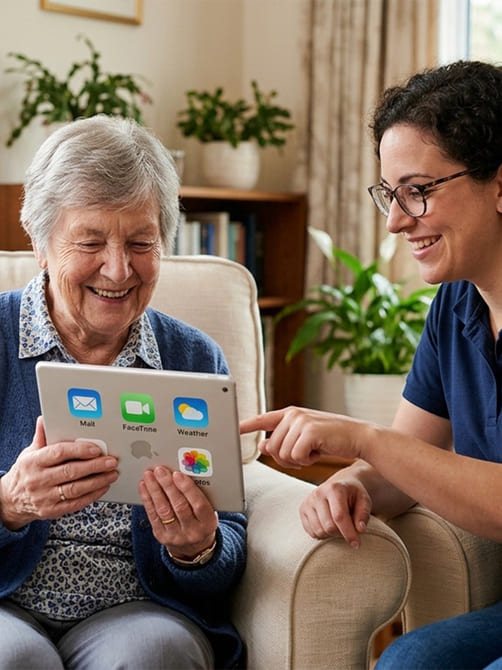
Digital Confidence Sessions for Every Device & User
Learn the digital skills you need with friendly, personalised guidance. From email and video calls to everyday apps and devices, our Digital Confidence Sessions empower you to use technology independently, safely, and confidently.
Digital Confidence Sessions
Feeling Overwhelmed by Technology?
We understand how confusing apps, devices, and online risks can feel — and we're here to help

Making Technology Simple and Stress-Free
Technology moves quickly. New apps, constant updates, security warnings, passwords to remember, unfamiliar settings — it can feel like everything changes just when you've finally figured it out.
Many people feel embarrassed to ask for help. But there's nothing wrong with not knowing something. Technology should make life easier, not stressful.
Whether you're unsure about online safety, confused by your smartphone, worried about scams, or simply tired of pressing the wrong button — we're here to guide you calmly and patiently.
With Digital Confidence Sessions, you'll:
- Understand what's happening on your devices
- Feel safer and more secure online
- Ask questions without judgement
- Build lasting confidence — step by step
Technology doesn't have to feel overwhelming. With the right support, it becomes something you control — not something that controls you.
The Skills You'll Gain
Practical, confidence-building abilities for everyday technology use
In our sessions, we focus on real-life skills that make technology feel simpler and less intimidating. Everything is explained clearly, at your pace, with plenty of time to ask questions. By the end, you won't just know what to press — you'll understand why you're doing it.

Computer & Laptop Skills
Friendly, one-to-one guidance on using Windows PCs and Apple Macs. Learn essential computer skills such as troubleshooting common problems, installing software, managing files, setting up email, connecting printers, running updates, and backing up your data — helping you use your computer with greater confidence and reliability.

Smartphone & Tablet Skills
Hands-on help for iPhone, iPad, and Android devices. Learn how to use your smartphone or tablet for everyday tasks including installing apps, managing photos, sending messages, making video calls, and adjusting privacy settings — all explained clearly so you can feel confident using your mobile devices.

Home Network Skills
Learn how your home internet and Wi-Fi network works and how to keep it running smoothly. We cover Wi-Fi setup, connecting smart devices, improving signal strength, and strengthening network security so your home technology stays connected, safe, and easy to manage.

Remote Assistance
Get secure remote technology support from the comfort of your home. Through a safe screen-sharing connection, we can help troubleshoot problems, guide you step-by-step, answer questions, and show you how to solve issues yourself — ideal for ongoing digital confidence and learning.
Our Approach to Digital Safety & Support
Helping You Stay Safe Online and Confident

Practical Support to Stay Safe Online
At Culm Forge Media, we help individuals navigate the digital world safely and confidently. From understanding online risks to hands-on support with devices, we're here to make technology accessible for everyone.
-
Understanding Your Needs
We take the time to learn how you use technology and identify areas where guidance can make the biggest impact.
-
Protecting Against Scams
We teach practical ways to recognise and avoid scams, phishing attempts, and online threats, keeping you secure.
-
Friendly Support
Whether it's a device, app, or account, we provide step-by-step guidance whenever you need help.
-
Confidence for the Long Term
We share ongoing tips, updates, and follow-ups so you feel empowered and confident using technology every day.
Everyone deserves to feel safe and confident online. Our approach combines personalised guidance, practical advice, and continuous support to make technology work for you.
Our Services
Helping you, your family, and your community use technology safely and confidently
Personalised IT Support for Vulnerable Users
Patient, one-to-one guidance to keep you connected and confident with technology.
Digital Skills Workshops
Interactive sessions to build practical skills for beginners and advanced users alike.
Family & Community Support
Helping families and community groups confidently use technology for everyday life.
Online Safety Guidance
Practical tips and support to protect yourself from scams, fraud, and online threats.
F.A.Q
Common Questions About Our Digital Confidence Sessions
What are Digital Confidence Sessions?
Digital Confidence Sessions are one-to-one or small group sessions designed to help individuals learn how to use computers, smartphones, tablets, and the internet safely and confidently. They cover basic device use, online safety, and practical digital skills.
Who are these sessions suitable for?
These sessions are ideal for beginners, older adults, vulnerable users, or anyone feeling unsure about technology. We also support families who want to improve their digital skills together.
Can I bring my own device?
Yes! We encourage participants to bring their own device, such as a laptop, tablet, or smartphone, so guidance is personalised and hands-on. If you don’t have a device, we can provide guidance using demonstration devices.
Do you offer support for online safety?
Absolutely. Sessions include practical guidance on online safety, avoiding scams, secure passwords, and protecting personal information. We ensure you feel confident navigating the online world.
How long is a typical session?
Sessions usually last between 60 to 90 minutes, depending on your needs. We focus on quality over quantity, ensuring you understand and can apply what you learn.
Can these sessions be done remotely?
Yes, we offer both remote and in-person sessions across Devon. Remote sessions use secure screen-sharing software, allowing you to get help from the comfort of your home.
What topics are covered?
Topics include device setup, email and messaging, using apps, browsing safely, managing passwords, cloud storage, video calls, online shopping, and troubleshooting common issues.
Do I need any prior knowledge?
No prior experience is needed. Our sessions are tailored to your skill level, whether you are a complete beginner or looking to improve your existing digital skills.
How do I book a session?
You can book a session directly through our website using the 'Book a Session' button, or contact us via email or phone. We’ll help you choose the right package and time.
Can family members join a session together?
Yes! We encourage families or friends to attend together if they want to learn collaboratively. Each participant will get personalised attention to ensure everyone benefits.