
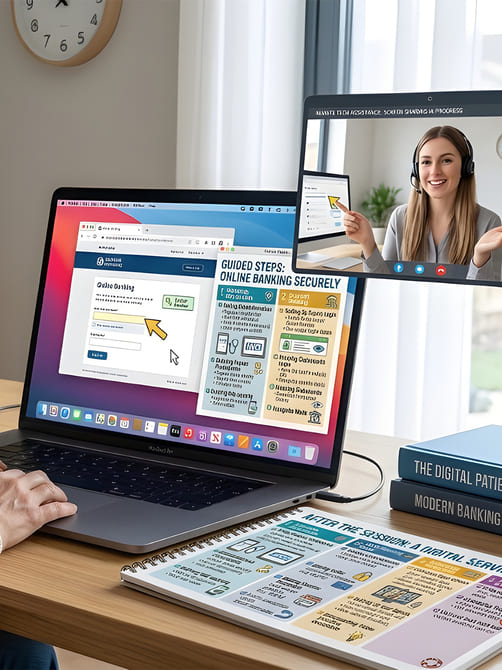
Secure Remote Assistance
Get fast, secure help without leaving your home. Our Remote Assistance sessions allow us to troubleshoot, fix, and guide you through technology issues wherever you are—saving you time and stress.
Remote Assistance
Help When You Need It Most
Remote guidance for devices, apps, online services and digital confidence

Personalised Support Without Leaving Home
Not everyone can attend in-person sessions — or maybe you just prefer help from the comfort of your own space. Our remote assistance sessions provide secure, one-to-one support for all your digital needs.
Using safe screen-sharing and guidance tools, we can troubleshoot devices, walk you through tasks, and answer your questions in real-time. You see every step, so you learn while we help.
Our sessions are patient, friendly, and tailored to your pace. Whether it's fixing an issue, learning a new skill, or understanding online safety, we ensure you leave feeling confident.
With Remote Assistance, you can:
- Get help on your device in real-time
- Learn how to solve similar issues independently
- Revisit guidance anytime using provided resources
- Stay safe online with secure, trusted assistance
Remote assistance is about more than fixing problems — it's about building lasting confidence so you can use technology safely and independently.
What Remote Assistance Covers
Comprehensive support tailored to your needs
Each session is personalised to focus on your challenges and goals, from device setup to online safety. You'll receive clear guidance while solving real problems, helping you learn practical skills that make technology easier to use.

Computer & Laptop Support
Get help troubleshooting issues, setting up software, organising files, installing updates, and resolving common computer problems. Sessions are guided step-by-step so you gain confidence using your computer or laptop independently.

Smartphone & Tablet Support
Friendly guidance on using iPhones, iPads, and Android devices. Learn messaging, video calls, apps, photo management, and important privacy settings while following along on your own device.

Online Safety & Security
Understand how to stay safe online by recognising scams, creating strong passwords, securing accounts, and browsing safely. We explain everything clearly so you can apply these protections straight away.

Follow-Up & Continued Support
After your session, you can access helpful reference materials and optional follow-up support. This ensures you can revisit what you learned and continue building confidence with technology.
Remote Support & Guidance
Helping you solve issues and build confidence with practical, secure support from anywhere
Secure Screen-Sharing Support
We use trusted tools to safely guide you through tasks on your own device.
Device Troubleshooting
Resolve issues with computers, smartphones, tablets, and home networks efficiently.
Step-by-Step Learning Materials
Resources and guides to reinforce skills and knowledge after each session.
Ongoing Guidance & Support
Optional follow-up sessions and advice to maintain digital confidence and security.
Our Remote Assistance Approach
Support You Can Trust From Anywhere

Secure, Patient, and Practical
Our remote assistance sessions are designed to be simple, secure, and easy to follow. We focus on solving your problem while helping you understand the steps involved, so you gain confidence and independence using your devices.
-
Assess Your Needs
We begin by understanding your device, the issues you're facing, and what you would like to achieve so the session focuses on what matters most to you.
-
Step-by-Step Guidance
Using secure remote tools, we guide you live on your own device so you can see each step clearly while the issue is resolved.
-
Reference Materials
You receive simple written guides and instructions after the session so you can revisit the steps and practise the skills you learned.
-
Confidence for the Long Term
Our goal is not just to fix the problem, but to help you feel comfortable using technology in the future with optional follow-up support if needed.
Remote assistance allows you to access trusted technical help without leaving home, making it easier to solve problems, learn new skills, and stay confident and safe when using technology.
F.A.Q
Common Questions About Our Remote Assistance
What is remote digital assistance?
Remote digital assistance is a one-to-one support session delivered online where a specialist helps you solve technology issues or learn digital skills using secure screen-sharing tools.
How does remote assistance work?
During the session, we connect using a secure remote support tool. You will see exactly what is happening on your device while we guide you through each step so you can learn while resolving the issue.
Is remote assistance safe and secure?
Yes. We use trusted and secure screen-sharing software and only access your device during the session with your permission. You remain in full control at all times.
What devices can you help with remotely?
Remote assistance can help with computers, laptops, smartphones, and tablets. Support is available for Windows PCs, Apple Macs, Android devices, and iPhones or iPads.
What types of issues can be solved remotely?
Remote sessions can help with installing software, troubleshooting problems, setting up devices, managing files, email configuration, app guidance, and improving online safety.
Do I need technical knowledge to use remote assistance?
No. Sessions are designed for beginners and are explained clearly step by step so you can follow along comfortably.
Will I learn how to solve problems myself?
Yes. Our goal is not only to fix the issue but to explain the process so you gain confidence and understand how to manage similar situations independently.
What if my issue cannot be solved remotely?
If the issue requires in-person support or further troubleshooting, we will advise on the best next steps and provide guidance on how to proceed.
Can I book follow-up remote sessions?
Yes. Many clients book follow-up sessions to continue learning, address new questions, or reinforce digital skills over time.
How do I request remote digital assistance?
You can request a session through the Culm Forge Media website. Once arranged, we will guide you through connecting securely for your remote support session.